
What the widget shows
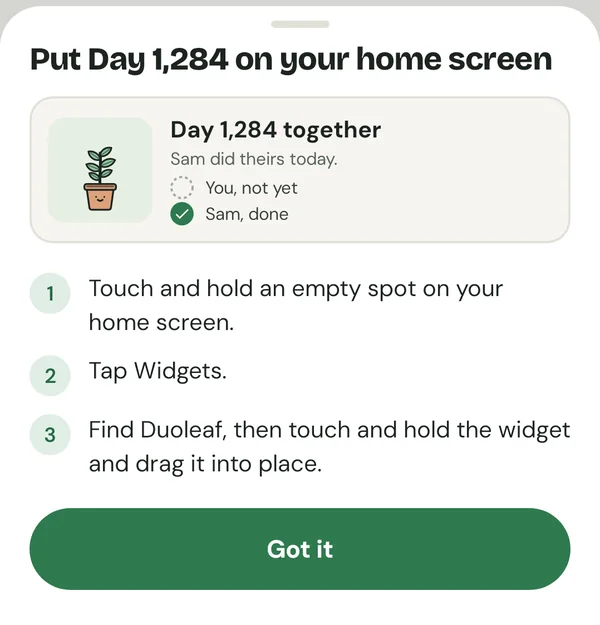
- Small: your days together, the plant, and a dot for each of you.
- Medium: "Day 1,301 together", a status line and both of your rows.
- Large: the plant, both rows and the leaf count.
Status lines are gentle: "You both showed up.", "Sam did theirs today." or "Olive is thirsty." There is no "your turn" nag.
Why some counter widgets look stuck
A common complaint in couple-app reviews is a widget that only updates after you open the app. Phones limit how often widgets refresh. Duoleaf refreshes the widget when anything changes in the app, and when your person finishes their session the app sends a silent update so the widget can change without you opening it. The day count itself is worked out on your phone, so it rolls over at midnight.
How to add it on Android
- Install Duoleaf and add the day you got together (you can skip it and add it later).
- Touch and hold an empty spot on your home screen.
- Tap Widgets, find Duoleaf, then touch and hold the widget and drag it into place.
Not sure which date to use? See when to start counting days together, or try the calculator first.
iPhone
Duoleaf is on Google Play now. The iPhone app, with home-screen and lock-screen widgets, is on its way. Your person can be on Android while you wait, and you can pair across both once it ships.
Questions
Is the widget free?
Yes. The default widget is free for both of you. Extra widget styles would be Premium, and only once more than one exists.
Does the widget update without opening the app?
Yes. It updates when anything changes, and when your person finishes their session the app sends a silent update. Phones can delay background updates a little.
Is there an iPhone widget?
Not yet. Duoleaf is on Android now and the iPhone version is on its way.
Can I use the counter without a partner in the app?
Yes. You can start on your own, add your date, and invite your person later.